May 12, 2026
Using E-Portfolios & Digital Tools For Assessments
When people imagine an assessment, they think of an exam with a learner sitting at a desk with a pen, a paper test and a clock ticking in the background. That image still has its place, but it no longer reflects how many vocational assessments are carried out.
In the modern world, learners prove their skills and knowledge in other ways like uploading photos of completed tasks, recording videos, taking part in online professional discussions or building a portfolio of evidence over time. Assessment is no longer limited to one room, one paper, all on one occasion.
This is where e-portfolios and digital tools for assessment have become so useful. They give learners different ways to show what they know and can do, whilst also helping assessors and Internal Quality Assurers keep evidence, give feedback and track the progress of learners.
But the technology is only part of the story. A digital system can help with learning and assessment, but it can’t replace good judgment. Assessors still need to understand the standards, choose suitable evidence and make fair decisions. IQAs still need to check that assessment practice is consistent, valid and well recorded.
What are tools for assessment?
Tools for assessment are the resources, systems and documents used to collect, record and judge learner evidence as well as give feedback to learners about their achievements and progress. Some are very simple, such as an observation form, a questioning template or a feedback sheet. Others are digital, like e-portfolio platforms where learners upload their work, online quizzes, video submission tools or digital learning platforms.
What matters most is that the tool is chosen to support the assessment. It should help the assessor make a fair decision, but not make the decision for them. For example, an observation record may be suitable for a practical task, while written questions may be better for checking knowledge. A video upload of a candidate carrying out a single task might support a workplace assessment, while a portfolio can help bring evidence from several tasks together.
This is where assessor training becomes important. To make an authentic assessment, assessors need to understand the standards, choose suitable assessment strategies and judge whether evidence is valid, current, sufficient and reliable. Digital technologies can make the process easier to manage, but good assessment still depends on the person making the decision.
What is an e-portfolio?
An e-portfolio is an online space where a learner can collect and organise evidence for their qualification. Instead of keeping everything in a paper folder, they can upload written work, photos, videos, witness statements, reflective accounts and other records to one place.
You may also see this called an electronic portfolio, e-portfolio or e-portfolio platform. Some centres use systems such as OneFile, Smart Assessor, Aptem, Moodle or an awarding body’s own online system. The exact platform depends on the qualification, centre and awarding body requirements.
In vocational assessment, e-portfolios are beneficial because learners usually collect evidence throughout their learning journey. A learner might complete a workplace task one week, answer knowledge questions the next and then add a reflection on what they have learned and put into practice later. The assessor can review this evidence, give assessment feedback and track what still needs to be completed.
Paper Portfolio vs E-Portfolio
Paper portfolios are still a valid assessment method and can work well in some teaching and learning environments. But they can become difficult to manage when learners are building evidence across several units, locations or assessment dates. An e-portfolio gives everyone involved a clearer way to store, review and update the learner’s evidence.
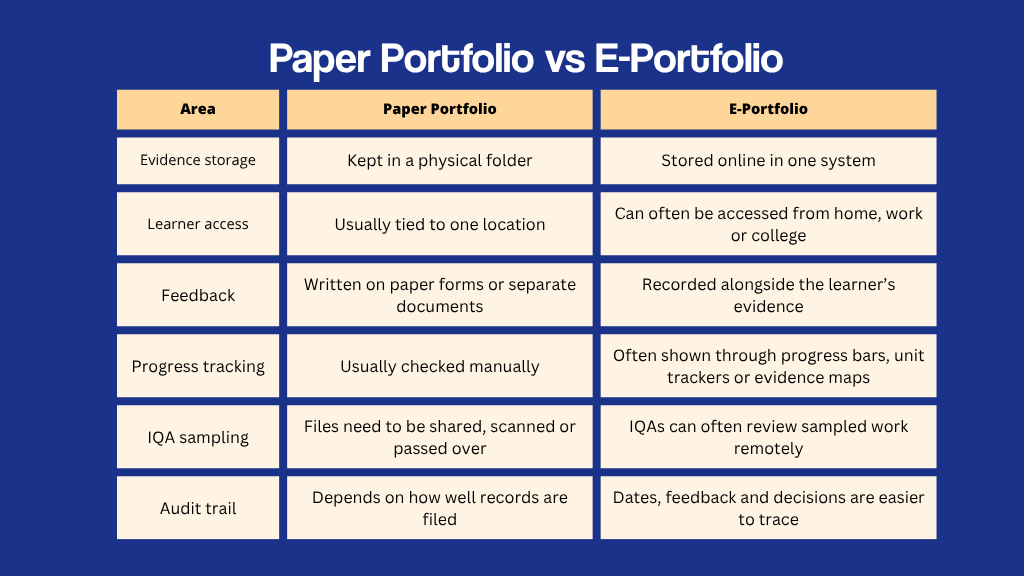
The benefits of using e-portfolios are usually most obvious when several people need to access the same records. Learners can see what they have completed, assessors can check what evidence is still missing and IQAs can review assessment decisions without chasing paper files.
That doesn’t mean traditional assessment methods are wrong. The best format depends on the qualification, centre systems, learner needs and awarding body rules. The aim is not to use digital tools for the sake of it, but to make learning and assessment easier to follow.
How Digital Tools Are Used in Vocational Assessment
Vocational assessment rarely happens in one neat sitting. A learner might demonstrate a skill at work, answer knowledge questions later, upload photographs of completed work and take part in a professional discussion weeks after the original task. The assessor then has to judge whether all this meets the qualification standards.
That is where digital tools can help. They give the assessment process a clearer structure, even when evidence is collected at different times and in different formats.
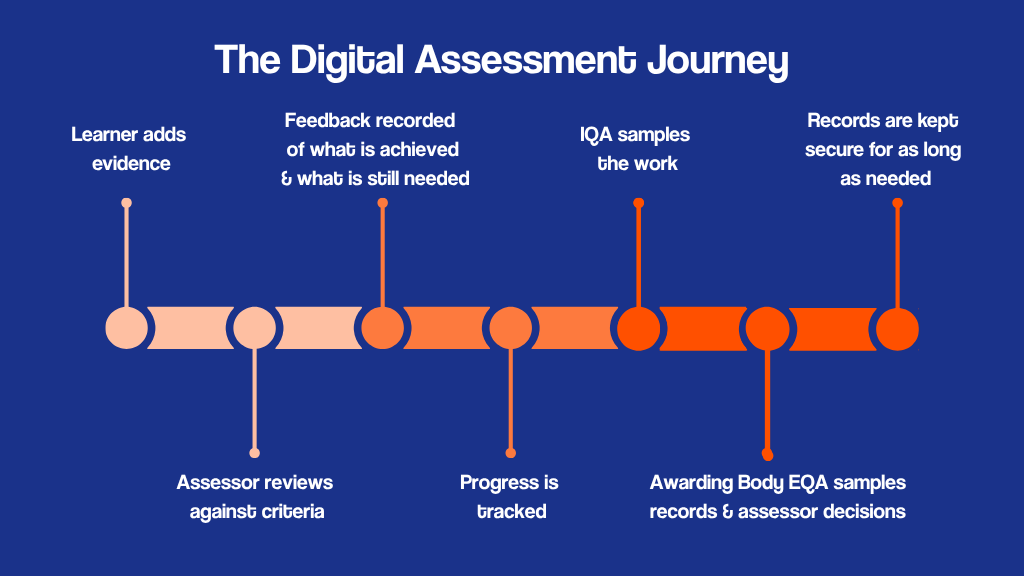
The digital assessment journey is not always a straight line. Learners gather evidence, assessors review it, feedback is recorded and IQAs may sample the decision later. A digital system helps each stage connect, so the assessment record is easier to follow.
Electronic assessment tools can also reduce the risk of gaps where a learner thinks they have completed everything but actually haven’t. Evidence can be uploaded as it is produced, feedback can be recorded alongside the relevant criteria and progress can be tracked throughout the qualification. This makes it easier for learners to see what they have done, for assessors to build a complete picture of learner competence, and easier for IQAs to review decisions without piecing together records from several places.
The Benefits of e-portfolios
The use of e-portfolios can make assessment feel more organised for everyone involved.
Learners Can Track Their Progress & Reflect on Their Learning
For learners, an e-portfolio can make the qualification feel less confusing. They can see what evidence they have already submitted, what feedback they have received and what still needs to be completed.
This can help them take ownership of their learning activities, instead of waiting for an assessor to tell them what comes next. It can also support reflection. A learner might upload evidence from a workplace task, then add a short reflective account explaining what they did, what went well and what they would improve next time.
Assessors Can Keep Evidence Organised
For assessors, e-portfolios reduce the risk of evidence being lost, duplicated or filed in the wrong place. This matters when they are managing several learners at different stages of their qualification.
Feedback, assessment decisions and supporting records can sit alongside the evidence they relate to. This gives the assessor a clearer assessment trail and makes it easier to check whether each piece of evidence has been reviewed properly.
IQAs Get A Clearer View Of Assessment Practice
For IQAs, the benefit is visibility. They can sample learner work, check the quality of assessor feedback and review whether decisions are consistent across the centre.
This makes internal quality assurance easier to manage, especially when assessors and learners are not all based in the same place. It also helps IQAs spot patterns, such as assessors giving unclear feedback or accepting evidence that does not fully meet the standard and helps them correct these.
Where Online Assessments Can Work Well
Online assessments can be useful when learners don’t need to be in the same room as the assessor to show their knowledge or provide evidence. This is especially helpful for distance learning, workplace learners and people who are studying around their job.
They can work well for formative or summative assessment practices like:
- Written questions
- Knowledge checks
- Case studies
- Reflective accounts
- Recorded presentations
- Professional discussions by video call
Supporting Distance Learning
In distance learning, online assessments make it possible for learners to complete parts of their qualification without travelling to and from a training centre each time. A learner might upload their written work, complete a knowledge task or take part in a professional discussion through a video call.
This gives the assessor a way to check progress against learning outcomes, give feedback and keep the learner moving through the course.
Checking Progress During The Course
Online assessments are especially useful for formative assessment because they allow assessors to check understanding during the learning process and guide them as they progress. A learner might complete a short task, receive feedback and use that feedback to improve their next piece of work.
This can make student learning more productive and the assessments feel more manageable because learners are not waiting until the end of the course to find out whether they are on track.
What Assessors Need to Be Careful Of
Digital tools can make assessment easier to manage, but they can also create a false sense of security. Just because evidence has been uploaded, labelled and stored neatly doesn’t automatically mean it’s correct. The assessor still needs to check the same things they would check in any other assessment.
Is the evidence the learner’s own work?
When evidence is submitted online, assessors need to be confident that it has been produced by the learner. This is especially important with written answers, reflective accounts, project work and uploaded documents, where it may be harder to see how the work was created.
An assessor should not accept evidence simply because it has been uploaded to an e-portfolio for assessment. They may need to ask follow-up questions, hold a professional discussion, compare the work with previous submissions or use witness testimony to confirm authenticity.
This matters because accepting work that is not the learner’s own can lead to unfair assessment decisions and may raise concerns around plagiarism, malpractice or maladministration.
Does the evidence meet the criteria?
Evidence should be judged against the qualification standards, not just accepted because it looks detailed or well presented. A long written answer or polished video is only useful if it matches the required criteria.
Is there enough evidence?
Assessors need to check that the evidence is sufficient. One photo, short answer or brief witness statement may not be enough to prove competence. The assessor must decide whether the learner has shown the required skills or knowledge fully enough.
Is the feedback clear?
Assessment feedback should help the learner understand what they have achieved and what they still need to do. Vague comments like “good work” or “add more detail” are not enough on their own. Good feedback should link back to the assessment criteria and explain the next step clearly.
Are records secure & easy to follow?
Digital records need to be stored safely and handled in line with centre policies. They should also be easy for an IQA or EQA to follow later. If the evidence, feedback and decisions are unclear, the platform has not solved the problem.
How Digital Assessment Tools Help IQA
An IQA’s work is much harder when records are difficult to follow. An IQA should be able to see what evidence was assessed, why the assessor made the decision and whether feedback was clear enough for the learner.
With an e-portfolio, the IQA can usually see the learner’s evidence, the assessor’s feedback, the assessment decision and any action points all in one place. This makes sampling more straightforward because the IQA can follow the assessment trail without asking for missing forms or waiting for a folder to be handed over.
Digital records can also support standardisation. If several assessors are working on the same qualification, the IQA can compare how evidence is being judged across different learners and assessors. This helps centres spot patterns, support assessors and improve consistency.
In terms of External Quality Assurance, a clear digital audit trail can also make a big difference. When evidence, assessor feedback and IQA comments are easy to follow, it is much easier to show how assessment decisions have been checked and quality assured.
Learn How To Assess And Quality Assure With Carlton Training
E-portfolios and digital assessment tools are now a normal part of many training, apprenticeship and workplace assessments. They can make assessment more flexible and easier to manage, but assessors and IQAs still need the right knowledge behind them.
Carlton Training provides assessor courses for people who want to assess learners in vocational, workplace or training environments. This includes the Level 3 Certificate in Assessing Vocational Achievement, often known as CAVA, which is suitable if you want to assess in both learning environments and the workplace.
If you’re already an assessor and want to move into quality assurance, Carlton Training also offers the Level 4 IQA qualification. This course is designed for those who need to sample assessment decisions, support other assessors and help maintain consistent standards across a centre.
Whether your next step is CAVA or IQA, the right qualification will help you understand the principles behind good assessment, not just the systems used to manage it. Our courses prepare you to assess confidently in both traditional and digital environments, helping you make valid, fair and inclusive assessment decisions that meet current industry expectations. Find out more about assessor courses or quality assurance courses and book your place today.
Next ›‹ Previous
Back to Blog